Editor Window
The following commands are available in the Kollmorgen Space Editor Window:

|
Add a new Kollmorgen Space instruction at the end of the current task instructions list. |

|
Add a new user comment line at the end of the current task instructions list. |
|
Assign a label name to the current selected instruction line. |

|
Insert a new Kollmorgen Space instruction or a new user comment into the current selected line. |

|
Edit the current selected line (Kollmorgen Space instruction or user comment). If the line is empty, this command follows the same behavior than pressing the 'Insert' button. |

|
Delete the current selected line (Kollmorgen Space instruction or user comment). |
The task tabs allow the user to edit the eight concurrent tasks on the drive handled by the Kollmorgen Space Application Executor on the drive.
-
- Task #7 is reserved for emergency handling.
The Application Notes tab allows the user to write comments describing the applications. You cannot program in this tab.

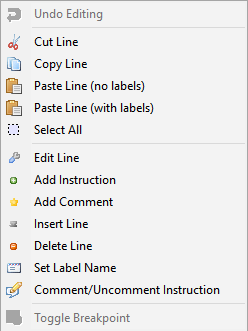
If you right-click inside the Editor Window, the following pop-up menu provides shortcuts for actions: